Advertisement

Saturday, 28 November 2015

WAGYU SHABU SHABU BUFFET @ KURATA JAPANESE RESTAURANT

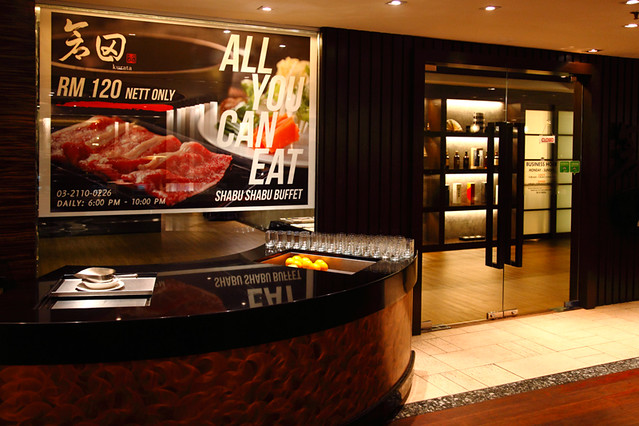
I am not going to elaborate on Kurata‘s eat-all-you-can Shabu Shabu. Why? Because you won’t need a lot of convincing from me to take opportunity of this awesome deal. In fact, it could very well be the best kept secret in town.
As long as you love shabu shabu and wagyu beef, there is no reason for you not to visit Kurata atParkroyal Hotel for this promotion. Anything else offered on the menu is just icing on the cake. Although the price of RM120 might be a barrier, I’m happy to say that the experience is worth every single cent you are paying.

Kurata Shabu Shabu Unlimited Wagyu
Initially, I was very skeptical when I saw Kurata’s Facebook ad which mentioned that they are serving wagyu for the eat-all-you-can shabu shabu. I mean, who wouldn’t be right? The promotion just sounds too good to be true.
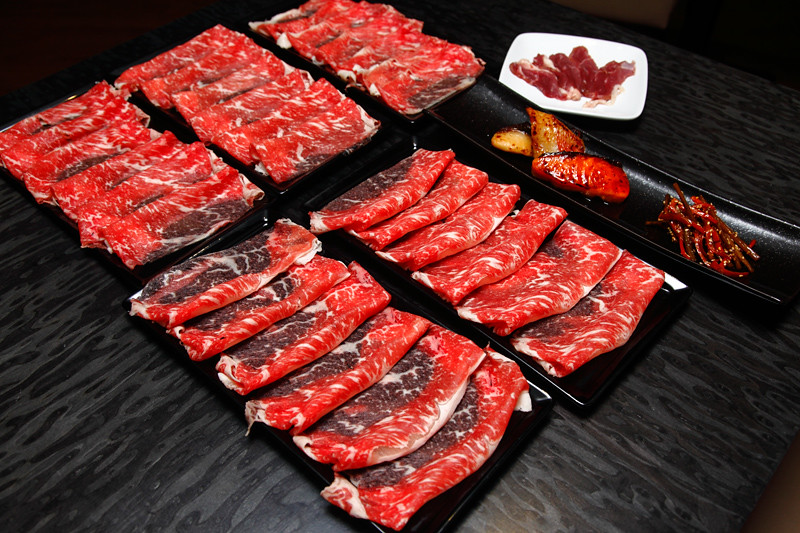
After clarifying with them personally twice, I finally took the plunge and went for it. So I present to you, the amount of wagyu beef we devoured that night – a total of 8 servings. And best of all, there’s no time limit so you enjoy the food at your own pace.
Kurata Shabu Shabu Wagyu Slices
Just look at the marbling on the beef, that’s wagyu alright and I couldn’t care less about the grade. No matter the grade, the quality still far exceeds any prime beef in the market. They are sliced thinly to cook quickly in a matter of seconds when you swish them around in the boiling broth. And needless to say, they were freaking delicious.
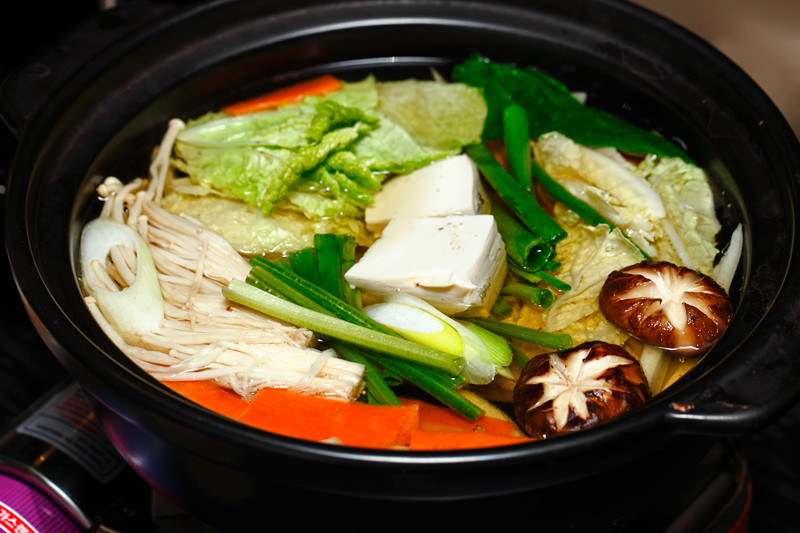
Kurata Shabu Shabu Pot
The vegetables included in the shabu shabu are fresh and sweetened up the broth in no time. At the end of the meal after the broth has been boiled with 8 plates worth of wagyu, the flavor was simply amazing.
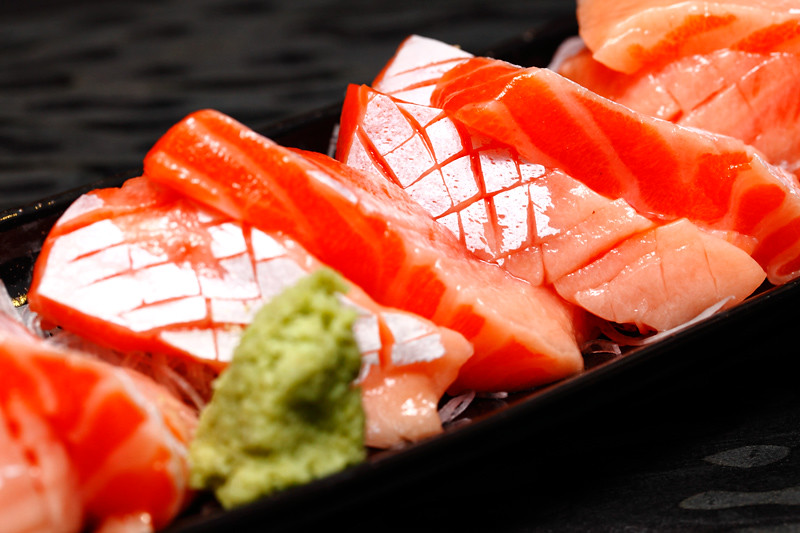
Kurata Salmon Sashimi
Based on some comments I saw on the ad, some said that the lack of seafood makes the promotion not so worthy for the price. But I have to disagree because there’s more than a handful of great seafood dishes offered in the menu – just that they are not meant for shabu shabu. To start off with, the salmon sashimi‘s quality is as good, if not heaps better than what you pay for at some a la carte Japanese restaurants.
Kurata Salmon Belly
And you get juicy salmon belly too. This was unexpected because most Japanese buffets only serve the normal cuts so it was a pleasant surprise. But just so you know, you have to request for it and the availability depends on the stock.
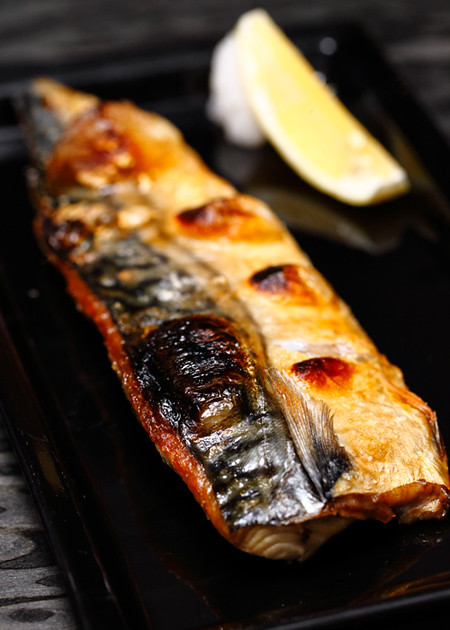
Kurata Saba Shioyaki
The Grilled Mackerel was done perfectly – crisp on the outside, firm and juicy on the inside.
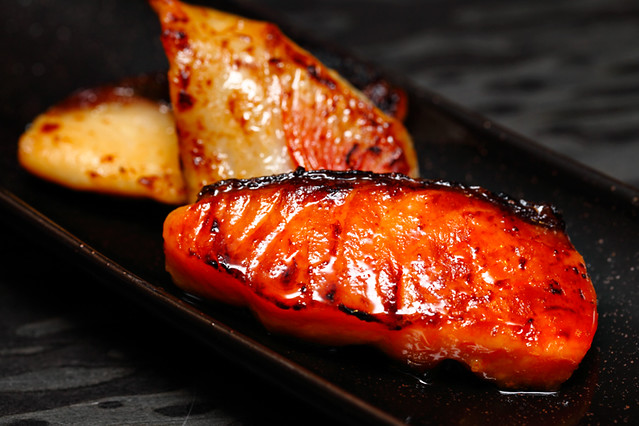
Black Cod Salmon Saikyo Yaki
Saikyo Yaki – mouthwatering salmon and black cod grilled in a flavorful miso marinade. I can’t recommend this enough, as both fishes were fresh and flaky in texture. The quality of this dish was impressive and we loved it.
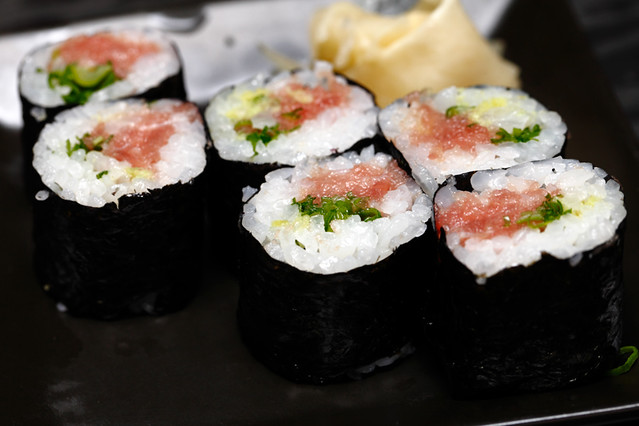
Kurata Tuna Roll
Tuna Roll – sounds and looks ordinary but it was actually prepared with Toro, the highly prized fatty tuna belly.
Kurata Small Fish Tempura
Small fish tempura – kind of like a mini version of shishamo but crispier and not as salty.
Kurata Fried Chicken Thigh
Deep fried chicken thighs – it’s probably one of the best Japanese fried chicken we ever had. Enough said.
Mixed Vegetable Tempura
Vegetable tempura
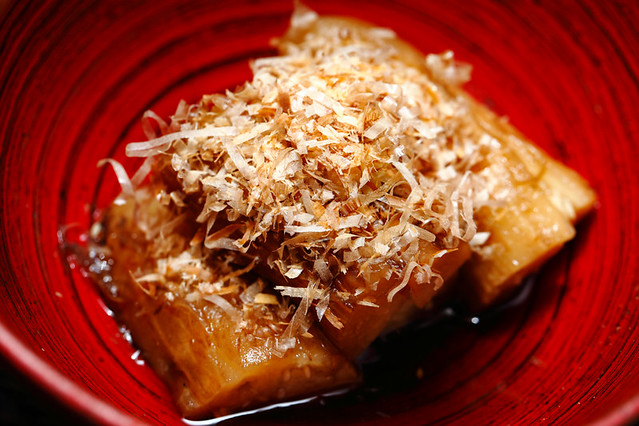
Eggplant with Marinated Sauce
Eggplant with marinated sauce and smoked bonito flakes, unique but it’s an acquired taste.
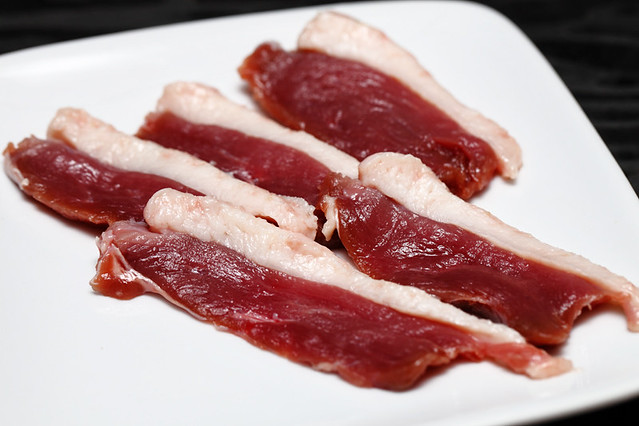
Kurata Shabu Shabu Duck Meat
There were only two items that we felt were below average. They were the overcooked chawanmushi and the duck meat which tasted too gamey for us. Other than those, everything else we had was great and enjoyable.
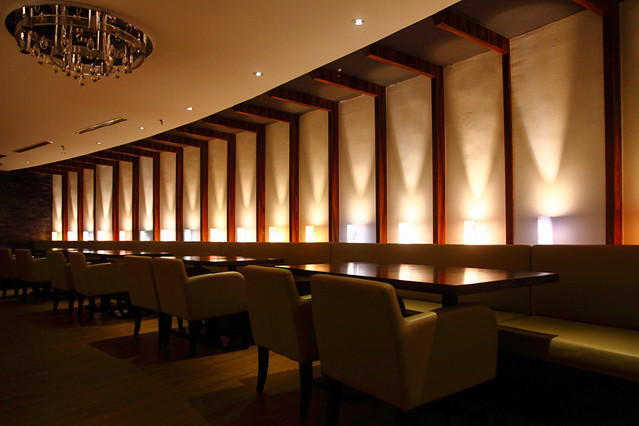
Kurata Japanese Restaurant Parkroyal
Besides the food, we were more than happy with the staff’s efficiency and friendliness – especially Paul who attended to us and made sure we were well taken care of. Despite arriving late at the restaurant at 9.30pm (last order is 10pm) they still took us in and did their best to accomodate us. Now that’s what I call service!
Kurata Shabu Shabu Menu
Kurata Japanese Restaurant KL
Kurata Japanese Fine Dining
Lower Lobby, Parkroyal Kuala Lumpur
Jalan Sultan Ismail, 50250, Bukit Bintang
Tel: 03-2110 0226
Business hours: 12pm – 2.30pm, 6pm – 11pm (lunch not available on Wed and Thu)
**Eat all you can shabu shabu only available for dinner 6pm onwards

ILLEGEAR UNLEASHES D9X GAMING LAPTOP: SUPPORTS DESKTOP SKYLAKE PROCESSOR AND GTX 980 GPU

Illegear D9X Gaming Laptop
Earlier this week, Illegear has officially announced the availability of its brand new D9Xgaming laptop. As the company has begun fitting Intel 6th generation Core processors (codenamed Skylake) into its gaming laptops since two months ago, D9X also features such chip but what Illegear has equipped into the laptop is not just any Skylake processor though.
Instead, the new D9X gaming laptop actually features desktop-grade Skylake processor. Customers have the option to equip their D9X with either Core i7-6700 which is a standard option for the laptop or go slightly further with Core i7-6700K which has unlocked CPU clock multiplier that allows the chip to be heavily overclocked.
Illegear D9X Gaming Laptop
Based on Clevo P870DM-G, the Illegear D9X also features NVIDIA GeForce GTX 980M GPUwith 8GB GDDR5 in it as standard. However, customers can choose to have the more powerful desktop version of GeForce GTX 980 GPU with 8GB GDDR5 in their D9X. SLI options are also available from Illegear in the form of dual GTX 970M or GTX 980M.
Equipped with a 17.3-inch full HD IPS display panel that supports NVIDIA G-SYNC technology, the D9X can also be fitted with up to 64GB of DDR4 RAM, two 2.5-inch storage drives, and two M.2 solid state drives. Other options that are available for the gaming laptop also includes dual-band Qualcomm Atheros Killer Wireless-AC 1535 network adapter and custom paintwork.
Illegear D9X Gaming Laptop
Given these high performance parts, the D9X does have a price tag to match with a starting price of RM 9,999. To know more, head on to their online store at store.illegear.com.

Qualcomm Shows Off Prototype ARM Server Chip

qualcomm-arm-chip-bw
Nearly a year ago at an analyst day event in New York, Qualcomm, the largest maker of ARM chips aimed at smartphones, told the world that it had aspirations for the big machines that feed those smartphones their data and applications and jumped into the 64-bit ARM server fray.
Today, Qualcomm showed off the first fruits of its ARM server labors, which the company divulged actually began more than two years ago, and that is a prototype chip that is intended for early adopters – presumably hyperscale customers who are always looking for a computing edge. The company also committed to delivering a production-grade ARM server chip as fast as it can without committing to a particular time.
Like other suppliers in the nascent ARM server space, Qualcomm has kept mum about its future server chips and roadmaps. But the revelation of a working pre-production version of an ARM server chip, and that it plans to come out next year with a beefier production chip that it says will compete against other ARM suppliers and the Xeon processors that currently rule the datacenter, is meant to show that Qualcomm is serious about getting into the datacenter. The partnerships that Qualcomm announced with networking chip and switch maker Mellanox Technologies and FPGA maker Xilinx are a significant part of the company’s plans for the data center – and echoing IBM’s own OpenPower Foundation partnerships that started out with Mellanox and Nvidia for networking and accelerated compute and that now include Altera and Xilinx. (With Intel buying Altera, it is reasonable to expect that Xilinx will play a key role with non-Xeon chip suppliers.) Qualcomm did not announce a partnership for GPUs with Nvidia and did not answer questions on that topic, but a partnership could happen in the future.
Given the intense competition between all ARM chip designers and the financial and market might that Intel can bring to bear against any competitor, Qualcomm is understandably hesitant to talk much about its server development platform, which is now sampling to tier one datacenter customers, according to Anand Chandrasekher, general manager of the Datacenter Group at the Qualcomm Technologies division of the chip maker. This division, created in 2012, is where Qualcomm does its open source projects and other developments where it wants to share intellectual property.
Qualcomm is not disclosing the core design or other attributes of its 64-bit ARM server chip except to say that it hews to the ARMv8-A specification from ARM Holdings and that it has 24 cores. Qualcomm is not revealing what process technology it is using to make the prototype chip or any details on clock speeds, cache memory, main memory, on-chip controllers, and other features, and it is not talking about its code-name, either. What the company is saying is that it will deliver a production-grade ARM server chip using an advanced FinFET 3D transistor process that will have more cores than the pre-production chip showed off today.
Qualcomm did not talk about who its fab partner was for the pre-production ARM server chip or for the production version that is coming out in the future, but Vinay Ravuri, vice president of product management in the Datacenter Group and formerly general manager of server products at Applied Micro, which is trying to ramp its X-Gene 64-bit ARM server chips, says that Qualcomm has historically used Taiwan Semiconductor Manufacturing Corp and Samsung, which have fabs in Taiwan, and Semiconductor Manufacturing International Corp, which runs fabs in China, as partners for its cell phone and other chips. It is reasonable to expect one of these vendors is making the as-yet-unnamed ARM server chips
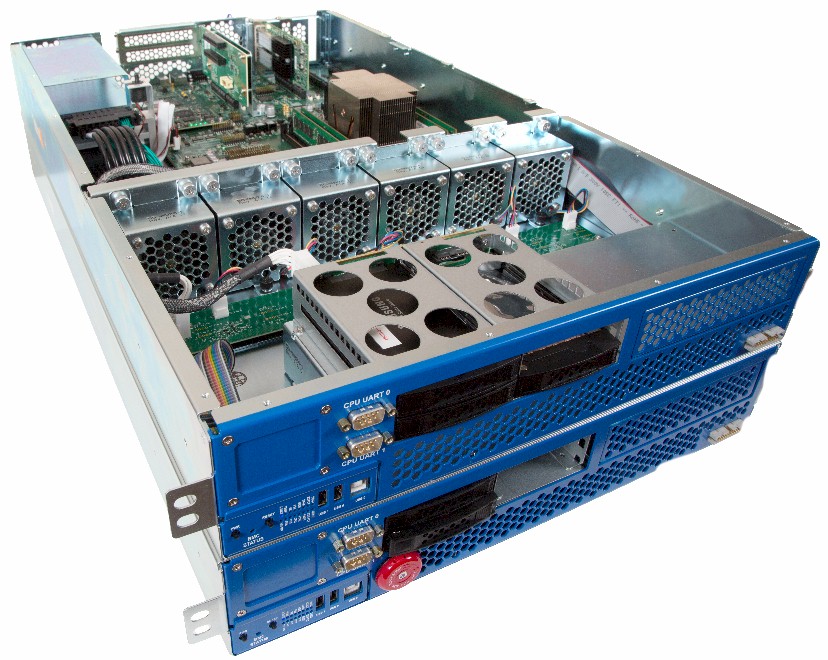
Rather than just trot out a presentation, the Qualcomm Datacenter Group team trotted out a stack of three of its server development platform machines at a meeting in San Francisco. The nodes were shown running a an open source Linux operating system with the 2.4 kernel, all orchestrated by the OpenStack cloud controller and using the KVM hypervisor to load up a standard Linux distribution and run a WordPress content management system fronted by the Apache web server. Ravuri tells The Next Platform that Qualcomm will put bits of code upstream in the Linux kernel to support its ARM server system-on-chip features and the modified ARM cores it has created for the chips, and that eventually the key Linux distributions will be enabled to support the Qualcomm processors.
qualcomm-arm-server
ARM Holdings licenses designs for ARM cores, interconnects, and other components of a system-on-chip to chip makers who in turn modify them for their own uses. This ability to have code portability while allowing customization is why ARM Holdings has hundreds of licensees for its technology. That enthusiasm for the malleability of chips in the ARM ecosystem, more than anything else, is why Intel is providing custom chips to hyperscale datacenter operators, cloud providers, and certain system makers. It is also why Intel is keen on learning how to make system-on-chip designs that are common in the client and networking areas where many of the ARM server chip makers are coming from.
Like AMD, Applied Micro, Broadcom, and Cavium Networks, Qualcomm is a full licensee of the ARMv8 architecture, and that means it can and does make its own cores rather than use the Cortex-A53, Cortex-A57, and Cortex-A72 cores that ARM develops itself for those who don’t want to make their own cores. (They all have to support the ARMv8 instruction set, of course.) Everyone is probably expecting that this ARM server chip is really just a variant of the Snapdragon 820 processor, with the “Kryo” core design, that was just announced for client devices, but this is apparently not the case.
“The chip we demonstrated today us based on Qualcomm purpose-built cores, they are not a licensed core,” Ravuri confirmed. “This is not based on the Snapdragon 820, these are server custom chips, and even the cores are server-specific cores, and are not mobile cores as the 820s are.” Ravuri cannot say much about the performance of the current prototype Qualcomm ARM server chip or the future one, but did say that “the future Qualcomm chip will be competitive in performance and price with current and future Intel chips.” As for the timing, Ravuri said it would be “sooner rather than later” but that he “can’t say when.”
That would be the current “Haswell” Xeon E5 v3 processors, launched in September 2014, and the future “Broadwell” Xeon E5 v4 processors, widely expected sometime in the spring of 2016. To be competitive with Intel means getting the future, production Qualcomm server chip out the door in 2016. This is when the other ARM suppliers for servers will also be ramping.
At the moment, the prototype ARM server chip from Qualcomm is limited to a single socket, and for many workloads, particularly at hyperscalers, that is fine so long as that socket has enough oomph and memory. But Ravuri conceded to The Next Platform that Qualcomm and its early adopter customers foresee the need for symmetric multiprocessing (SMP) clustering of processors together for certain workloads using ARM chips. Thus far, the ThunderX chip from Cavium Networks is the only ARM supplier with two-way SMP. The point is, SMP is definitely on the Qualcomm roadmap, although precisely when it might appear is unknown.
Designing a chip is one thing, but what makes Qualcomm think it can deliver the server goods? Ravuri explains:
“To really succeed, you need to have staying power, and that is one of the advantages that Qualcomm has. The second thing is, we have the ability to invest in leading edge nodes. Intel is very powerful because of its fabs, as everybody knows. So to compete, you have to be on a leading edge node, and being a mobile company, Qualcomm does have those assets and that will help a lot. Customers have been waiting, and one of the reasons why ARM has not really taken off is that buyers want a company that is viable and that they can count on being here for the next five to ten years for several generations of products.”
Ravuri says that Qualcomm is working with the top eight hyperscalers in some form or another – that’s Amazon, Facebook, Google, and Microsoft in the United States and Alibaba, Baidu, China Mobile, and Tencent in China – but did not confirm who is actually getting test kit and who might have made any commitments to actually use ARM servers in production. He added that Qualcomm is working with original design manufacturers (ODMs), who make machines on behalf of these hyperscalers and service providers, and original equipment manufacturers (OEMs) like the dominant server makers in the world. Dell, Hewlett-Packard, and Lenovo probably have the most interest in ARM chips among the server OEMs, but again, Qualcomm is not naming names.

Friday, 27 November 2015

HP SPECTRE X360 REVIEW – A SOLID, WELL-DESIGNED BUT PRICEY PRODUCTIVITY MACHINE

HP Spectre x360007
As a premium end laptop line, HP’s Spectre series has always upheld a certain level of classy aesthetics and design. The current HP Spectre x360 upholds the premium design promise, but for the first time also introduces an increasingly common folding hinge option with a touch display, offering users a new way to interact with the device. 

SPECIFICATIONS

HP Spectre x360 Specs
Our review unit comes with a fifth-generation Intel Core i5 processor with 8GB of RAM and 128GB of storage. The 13.3-inch Full HD display is touch-enabled, letting users flip the display and use it in four different modes: Laptop, Tablet, Stand and Tent – just like other laptops with a folding hinge design.
Unlike other laptops of this sort, the Spectre x360 is really light at just 1.44kg – and there’s an extra wide touch pad and three USB 3.0 ports.

DESIGN

HP Spectre x360001
The Spectre x360’s silver steel design is reminiscent of previous models, including a tapered edges. One would not be wrong to say that it is almost inspired by the handsome looks of the MacBook Air. HP maintains a distinguished industrial design on the Spectre series, which can be regarded as one of the better designed and more premium-feeling Windows machines you can find today.
HP Spectre x360002
HP chose a simple double hinge design to allow the Spectre x360 its necessary flexibility. It gets the job done, and the hinge is much stronger and inspires a whole lot more confidence than older HP Spectre models. In fact, this a massive improvement as far as construction goes.
HP Spectre x360014
However, when used in tablet mode, I suspect HP’s design team may have thought it was still designing a regular clamshell laptop. It looks great when the laptop is used in a more traditional way, either closed or with the keyboard facing up. It doesn’t look as good with the laptop folded over in tablet mode. The two halves don’t fold flush against one another, leaving a gap at the end because of the tapered ends. It doesn’t affect how the tablet is used, but it looks quite unsightly.

USER EXPERIENCE

HP Spectre x360017
I had the privilege of traveling with the Spectre x360; a situation that put its abilities as a mobile working platform to the test. An emphasis has to be put on the “working” bit of the experience, considering that HP intended this machine for productivity and not much else. The hardware doesn’t quite allow for gaming, given the fact that it only has an integrated Intel GPU.
We should begin with the good points, where the Spectre x360 improves on its predecessors. The addition of a touch display and a 360-degree hinge offers a new way of using a Windows laptop, and allows HP to compete with other manufacturers already offering this option. Lenovo was on to something when it invented the Yoga devices, and it is no accident that every other manufacturer is integrating the design into their respective notebooks.
HP Spectre x360018
The 360-degree hinge allows the Spectre x360 to rest in the most comfortable position for the user. This is highly important because the keyboard can be uncomfortable to use at times. It is not entirely the keyboard’s fault for this, despite the key presses being unusually shallow even for a laptop. Rather, it is a problem with the lower edge of the chassis that is not rounded off. The edge digs into the wrists while typing, making it unpleasant to use for long periods, one of the occasions where ergonomics makes way for aesthetics. Being able to angle the display helps alleviate the problem somewhat.
HP Spectre x360008
That being said, the folding feature is not as useful as the designers want it to be. The common problem is that people who buy laptops are looking for just that. The size of the Spectre x360 is a bit bigger than what is comfortable in a tablet, meaning that the device will likely remain as a laptop for most of the time. It’s not that the Spectre x360 is bad as a tablet, but rather that the mode is unlikely to see much use – not to mention navigating Windows with a touch display isn’t really the most efficient thing to do. I personally only flipped it over just to see what it would look like. However, the versatility means that it can still fill the gap of a tablet when it needs to, such as using it in cramped spaces in Stand mode.
HP Spectre x360016
HP’s usual speaker technology doesn’t quite work with the Spectre x360. Like most laptops, it relies on the acoustic properties of tables to help amplify the audio. This works fine for times when there is a table and it is kept in laptop mode. It doesn’t quite work with the machine folded over. It could be that the curved edges on the top half diffuses the sound instead of redirected it back at the user. Either way, this results in audio that is barely audible from more than a metre away – nothing more than enough for just the user.

PERFORMANCE

HP Spectre x360015
HP Spectre x360 PCMark 7
On the whole, the Spectre x360 does what it sets out to do. It works well for filing news stories on the go, which I speculate also means that it will be fine for people who need to edit documents and look at spreadsheets while out of the office. Otherwise, the HP Spectre x360 is not going to win any prizes for performance. Its 8GB RAM and 128GB storage are bog standard for laptops these days, and for its price especially, 128GB is rather tiny.
HP Spectre x360003
HP Spectre x360005
Gaming is limited to extremely low demand games, which excludes most of the triple A titles. This isn’t really a problem, since the tiny 13-inch display is not optimal for gaming anyway.
That being said, games like Minecraft, FTL: Faster Than Light, Hearthstone, and most other indie titles will run just fine on the Broadwell processor. It’s not great, but there is some entertainment value to the Spectre x360. Then again, some gamers get a lot of mileage out of just playing Minecraft.

BATTERY LIFE

HP Spectre x360009
Battery life is where the Spectre x360 excels. We ran our usual test of looping a 1080p video at 50-percent brightness until the machine goes into standby mode – and we would like to point out that this is not an enjoyable experience when the number of hours runs into double digits.
Our test showed a run time of some 11 and a half hours before the Spectre x360 gave up. In normal usage, the laptop easily breezes through a working day (though things get a little worrying closer to 6pm). The Spectre x360 offers plenty of power for long working days, especially for times when there is a lack of opportunity to recharge. In other words, this is great for road warriors… or marathon Hearthstone sessions while stealing WiFi in Starbucks.

COMPETITION

As a premium productivity Ultrabook with a touch display and 360-degree hinge, the HP Spectre x360 actually does not have plenty of competition. While there are many convertible and hybrid laptops, few are in the same niche as the HP laptop.
ThinkPad_Yoga_260_3
One such device is the Lenovo ThinkPad Yoga. Targeting the same niche market (though at a noticeably higher price range), the ThinkPad Yoga is another premium offering for road warriors and business users. Lenovo practically invented the folding hinge design, and knows how to make it work. In terms of hardware, the two devices are similar enough that users will not notice the difference. However, I will have to admit that Lenovo tends to have the advantage in terms of comfort. The Lenovo’s trademark chiclet style keyboard gives it a slight edge over the Spectre x360, not to mention the ThinkPad’s industrial-grade protection for its hardware. With a price of around RM5,000 (retail prices vary), the Spectre suddenly appears affordable.
DellInspiron13_7000
At the other end of the spectrum, there’s Dell’s Inspiron 7000 series. Designed as an entry-level hybrid laptop, what the Dell lacks in terms of aesthetics it makes up for in pricing. As is the case with laptops, the hardware is more or less similar, with the Inspiron sporting a newer Skylake processor but just a physical hard drive for RM3,699. The Inspiron is virtually the Spectre x360’s direct competitor, even if it is slightly thicker and heavier.

Conclusion

HP Spectre x360011
The HP Spectre x360 fills a specific niche, and does it well. While it does not have the benefit of the newer Skylake processor (though it’s likely HP will be fixing this in the near future), the Broadwell architecture is more than adequate for the purpose of whoever picks up this laptop.
This is a purely subjective matter, but for what it’s worth there are many machines that can achieve the same performance for less. That said, HP’s design acumen is something rarely seen on Windows machines, which might explain the slightly higher price point.
HP Spectre x360012
As far as value goes, you can do much worse than the Spectre x360. It is a great improvement over previous versions of the Spectre line, and that is a good thing. As far as convertibles go, I actually grew like the folding hinge feature. It is not terribly useful, but it is a nice trick and offers options when I need it. For purely work purposes, I would be hard pressed to recommend this laptop, as the price is a little higher than I would feel comfortable paying. Perhaps others might think otherwise.
New Lenovo Yoga 900 laptop has poweful Intel Skylake processor


Windows 10 laptops abound this season, and Lenovo, the world's biggest PC maker, certainly wasn't going to miss all the fun.
Today the Chinese computer maker announced the new Yoga 900, the latest in its line of "bendy" convertible laptops that can be used as a traditional laptop, a tablet or a propped up display in tent mode.
Its gold body might be what catches your eye initially (or make you think of the gold MacBook); but as the saying goes, it's what's on the inside that counts. The Yoga 900 runs on the new sixth-generation Intel Core i5 or i7 Skylake processor, a new chip from Intel that's supposed to offer greater performance and reduced power consumption. It comes with up to 16 gigabytes of memory, can be configured with a 512GB SSD and has JBL stereo speakers with Dolby Audio.
The Yoga 900 has a quad-HD, 13-inch display, a roomier keyboard and a larger trackpad than previous Yogas. At 2.8 pounds and 14.9mm thick, the Yoga 900 is just a tad heavier and bulkier than last year's Yoga 3 Pro, but that's to accommodate a bigger battery: Lenovo is estimating up to eight hours of battery life with this model, compared with the 7.4 hours of battery life with the Yoga 3 Pro. And Lenovo is still claiming it's the world's thinnest Core I convertible laptop.
And, of course, it's running on Windows 10, taking advantage of the Continuum feature that lets users switch between keyboard and tablet mode more easily.
Lenovo has certainly gotten favorable reviews over the past few years for its Yoga line, blending high-performance with sleek design and an innovative hinge that lets users bend the laptop in all sorts of ways. Still, its biggest line of business is still its ThinkPad line of laptops. And while the Yoga sells well in the U.S. and Europe, it's less popular in China, a market where other Lenovo products dwarf competitors.
The new Yoga 900 convertible laptop starts shipping today for $1,199.99 for the base model, and comes in three colors: silver, orange, and gold. That's not your $500 holiday laptop bargain, but then again, the top-of-the-line Lenovo Yogas never are.

LENOVO YOGA 900 HANDS ON: A VERSATILE FEATHER-LIGHT LAPTOP

lenovo-product-launchIMG_0111
Lenovo has just launched the Yoga 900 – a convertible laptop that runs on Intel’s latest 6th generation Skylake processor. Being a product under the Yoga lineup, this laptop can be used in four different modes: laptop, stand, tablet, and tent. Yes, the Yoga 900 is fast and light, but what else does it have to offer?
On paper, the Lenovo Yoga 900 convertible laptop can be equipped with Intel’s latest 6th generation core i7 processor. Not only that, it can also be fitted with up to 16GB of RAM and have a maximum of 512GB SSD storage. The display is a 13.3-inch QHD+ IPS multitouch screen, boasting a resolution of 3200 x 1800 and a maximum brightness level of 300 nits.
batch_IMG_0130
As it does not have a dedicated GPU, the Yoga 900 utilises Intel’s integrated HD graphics instead. Additionally, the laptop has a 1MP 720p HD camera on the front and a Dolby-certified JBL stereo speaker system. More impressively, the convertible measures 14.9mm thin and weighs 1.29KG.
lenovo-product-launchIMG_0139
When I picked up the Yoga 900, I was pretty impressed with how light it is. The combination of the aluminium on the exterior with the palm rest and display frame made from plastic definitely contributed to it being so lightweight. The outside of the laptop definitely screams premium, and despite the fact that plastic was used in the overall construction of the laptop, it doesn’t diminish its overall premium feel.
By having a QHD+ IPS screen, the display of the Yoga 900 is really pleasant to look at. It is bright enough and the blacks are black. Colours are vibrant, and it has good viewing angles as well. That being said, the convertible does have a really glossy display which interferes with the overall viewing experience, not to mention how much of a fingerprint magnet it is.
batch_IMG_0134
The watchband hinge in the middle of the laptop is one of the most attractive part of the screen. It has 800 individual pieces woven together to form the hinge that transforms the laptop into four different modes. Each mode feels rigid and the transition is smooth – rather natural really. So for those who have doubts with the watchband hinge, no need to worry; the Yoga 900 won’t fall apart that easily.
lenovo-product-launchIMG_0143
When I took the Yoga 900 for a quick spin, it performed pretty well. Folders and applications opens in an instant, as expected of a laptop with an SSD. I didn’t have the time to play any games on the laptop, but seeing that it only uses integrated Intel HD graphics, I don’t see myself or anyone else playing Star Wars Battlefront or Fallout 4 on this.
batch_IMG_0135
In terms of audio, the JBL speakers on the Yoga 900 really did not disappoint. There was a good balance of treble and bass, and with the help of Dolby, the audio performance on the laptop is really rich. However, because of the overall ambient noise at the event, I couldn’t judge the laptop’s volume properly.
batch_IMG_0138
batch_IMG_0144
Besides that, the keyboard of the Yoga 900 has good travel and typing on it is satisfactory. The trackpad, on the other hand, feels smooth and offers a tiny amount of resistance. It’s pretty accurate, but I personally prefer to use the touchscreen. It is very responsive and my touch inputs were accurate most of the time. To put this to the test, I drew a straight line on the Paint app with my finger, and I could see that my line was perfectly traced.
batch_IMG_0149
At the time of this writing, we do not know how much the Yoga 900 will be sold for in Malaysia. Since it is a lightweight laptop that runs on an Intel Skylake processor, has a beautiful display, and even a SSD storage, there’s a good chance this laptop will not be affordable. That being said, the Yoga 900 is an interesting convertible, and I can’t wait to get my hands on it once again for a full review.