Advertisement

Showing posts with label laptop. Show all posts

Sunday, 24 January 2016

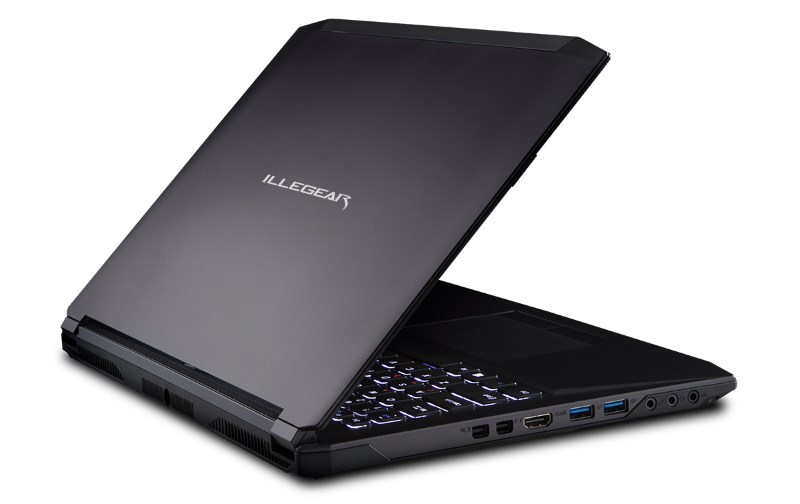
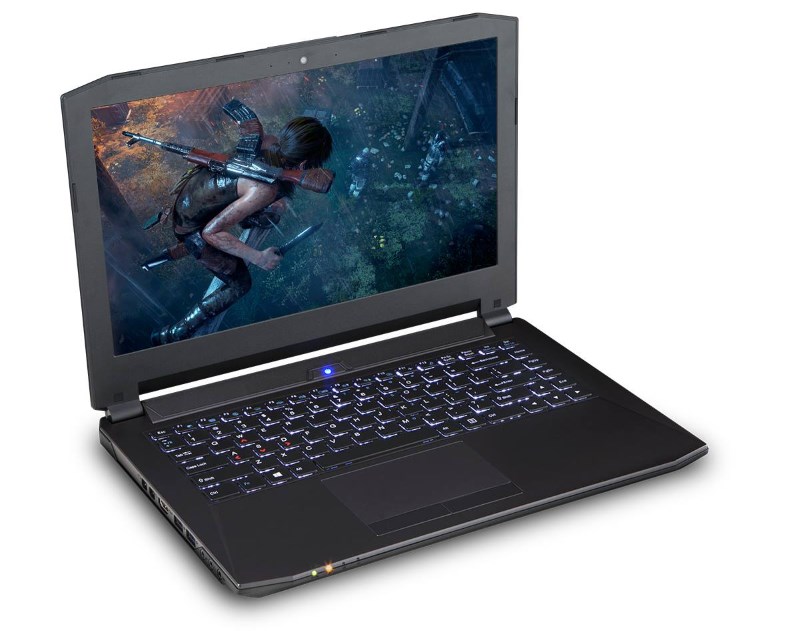
ILLEGEAR UNVEILS ITS NEW 14-INCH S4 GAMING LAPTOPILLEGEAR UNVEILS ITS NEW 14-INCH S4 GAMING LAPTOP

Illegear S4 Gaming Laptop
Illegear might have released it rather quietly but the new 14-inch Illegear S4 gaming laptop can be seen as a perfect addition to the company’s S Series which was only available as 15 and 17-inch models previously. While hardware customization options for the S4 are rather limited as compared to its bigger siblings, the new laptop is still packed with serious firepower.
Based on Clevo P640RE, the S4 is equipped with a 14-inch full HD (1920 x 1080) IPS display made by LG which also has 100% sRGB color gamut. With a thickness of 25.4mm, the 2kg gaming laptop is powered by a 2.6GHz Intel Core i7-6700HQ processor while graphics duties are handled by NVIDIA GeForce GTX 970M with 3GB worth of GDDR5.

Illegear S4
In terms of memory, customers are able to equip their S4 with up to 32GB DDR4 RAM while the laptop can be fitted with up to two 2.5-inch solid state drives and one M.2 solid state drive. Additionally, users can choose to fit their S4 with wireless network adapter from either Intel or Killer Networking.
The laptop also features a pair of 2-watt speakers that are enhanced by Sound Blaster X-Fi MB5 as well as a full HD webcam and built-in microphone. Not to forget, it also comes with a 45Whr battery.
Illegear S4
As per previous Illegear laptops, customers are more than welcome to request for custom backlight color for the laptop’s keyboard. They are also able to make their S4 totally unique by having custom artwork or paint job on their laptop. With a price tag that starts atRM 5,799, the new Illegear S4 is available immediately through the company’s online store.

Saturday, 28 November 2015

ILLEGEAR UNLEASHES D9X GAMING LAPTOP: SUPPORTS DESKTOP SKYLAKE PROCESSOR AND GTX 980 GPU

Illegear D9X Gaming Laptop
Earlier this week, Illegear has officially announced the availability of its brand new D9Xgaming laptop. As the company has begun fitting Intel 6th generation Core processors (codenamed Skylake) into its gaming laptops since two months ago, D9X also features such chip but what Illegear has equipped into the laptop is not just any Skylake processor though.
Instead, the new D9X gaming laptop actually features desktop-grade Skylake processor. Customers have the option to equip their D9X with either Core i7-6700 which is a standard option for the laptop or go slightly further with Core i7-6700K which has unlocked CPU clock multiplier that allows the chip to be heavily overclocked.
Illegear D9X Gaming Laptop
Based on Clevo P870DM-G, the Illegear D9X also features NVIDIA GeForce GTX 980M GPUwith 8GB GDDR5 in it as standard. However, customers can choose to have the more powerful desktop version of GeForce GTX 980 GPU with 8GB GDDR5 in their D9X. SLI options are also available from Illegear in the form of dual GTX 970M or GTX 980M.
Equipped with a 17.3-inch full HD IPS display panel that supports NVIDIA G-SYNC technology, the D9X can also be fitted with up to 64GB of DDR4 RAM, two 2.5-inch storage drives, and two M.2 solid state drives. Other options that are available for the gaming laptop also includes dual-band Qualcomm Atheros Killer Wireless-AC 1535 network adapter and custom paintwork.
Illegear D9X Gaming Laptop
Given these high performance parts, the D9X does have a price tag to match with a starting price of RM 9,999. To know more, head on to their online store at store.illegear.com.

Friday, 27 November 2015

HP SPECTRE X360 REVIEW – A SOLID, WELL-DESIGNED BUT PRICEY PRODUCTIVITY MACHINE

HP Spectre x360007
As a premium end laptop line, HP’s Spectre series has always upheld a certain level of classy aesthetics and design. The current HP Spectre x360 upholds the premium design promise, but for the first time also introduces an increasingly common folding hinge option with a touch display, offering users a new way to interact with the device. 

SPECIFICATIONS

HP Spectre x360 Specs
Our review unit comes with a fifth-generation Intel Core i5 processor with 8GB of RAM and 128GB of storage. The 13.3-inch Full HD display is touch-enabled, letting users flip the display and use it in four different modes: Laptop, Tablet, Stand and Tent – just like other laptops with a folding hinge design.
Unlike other laptops of this sort, the Spectre x360 is really light at just 1.44kg – and there’s an extra wide touch pad and three USB 3.0 ports.

DESIGN

HP Spectre x360001
The Spectre x360’s silver steel design is reminiscent of previous models, including a tapered edges. One would not be wrong to say that it is almost inspired by the handsome looks of the MacBook Air. HP maintains a distinguished industrial design on the Spectre series, which can be regarded as one of the better designed and more premium-feeling Windows machines you can find today.
HP Spectre x360002
HP chose a simple double hinge design to allow the Spectre x360 its necessary flexibility. It gets the job done, and the hinge is much stronger and inspires a whole lot more confidence than older HP Spectre models. In fact, this a massive improvement as far as construction goes.
HP Spectre x360014
However, when used in tablet mode, I suspect HP’s design team may have thought it was still designing a regular clamshell laptop. It looks great when the laptop is used in a more traditional way, either closed or with the keyboard facing up. It doesn’t look as good with the laptop folded over in tablet mode. The two halves don’t fold flush against one another, leaving a gap at the end because of the tapered ends. It doesn’t affect how the tablet is used, but it looks quite unsightly.

USER EXPERIENCE

HP Spectre x360017
I had the privilege of traveling with the Spectre x360; a situation that put its abilities as a mobile working platform to the test. An emphasis has to be put on the “working” bit of the experience, considering that HP intended this machine for productivity and not much else. The hardware doesn’t quite allow for gaming, given the fact that it only has an integrated Intel GPU.
We should begin with the good points, where the Spectre x360 improves on its predecessors. The addition of a touch display and a 360-degree hinge offers a new way of using a Windows laptop, and allows HP to compete with other manufacturers already offering this option. Lenovo was on to something when it invented the Yoga devices, and it is no accident that every other manufacturer is integrating the design into their respective notebooks.
HP Spectre x360018
The 360-degree hinge allows the Spectre x360 to rest in the most comfortable position for the user. This is highly important because the keyboard can be uncomfortable to use at times. It is not entirely the keyboard’s fault for this, despite the key presses being unusually shallow even for a laptop. Rather, it is a problem with the lower edge of the chassis that is not rounded off. The edge digs into the wrists while typing, making it unpleasant to use for long periods, one of the occasions where ergonomics makes way for aesthetics. Being able to angle the display helps alleviate the problem somewhat.
HP Spectre x360008
That being said, the folding feature is not as useful as the designers want it to be. The common problem is that people who buy laptops are looking for just that. The size of the Spectre x360 is a bit bigger than what is comfortable in a tablet, meaning that the device will likely remain as a laptop for most of the time. It’s not that the Spectre x360 is bad as a tablet, but rather that the mode is unlikely to see much use – not to mention navigating Windows with a touch display isn’t really the most efficient thing to do. I personally only flipped it over just to see what it would look like. However, the versatility means that it can still fill the gap of a tablet when it needs to, such as using it in cramped spaces in Stand mode.
HP Spectre x360016
HP’s usual speaker technology doesn’t quite work with the Spectre x360. Like most laptops, it relies on the acoustic properties of tables to help amplify the audio. This works fine for times when there is a table and it is kept in laptop mode. It doesn’t quite work with the machine folded over. It could be that the curved edges on the top half diffuses the sound instead of redirected it back at the user. Either way, this results in audio that is barely audible from more than a metre away – nothing more than enough for just the user.

PERFORMANCE

HP Spectre x360015
HP Spectre x360 PCMark 7
On the whole, the Spectre x360 does what it sets out to do. It works well for filing news stories on the go, which I speculate also means that it will be fine for people who need to edit documents and look at spreadsheets while out of the office. Otherwise, the HP Spectre x360 is not going to win any prizes for performance. Its 8GB RAM and 128GB storage are bog standard for laptops these days, and for its price especially, 128GB is rather tiny.
HP Spectre x360003
HP Spectre x360005
Gaming is limited to extremely low demand games, which excludes most of the triple A titles. This isn’t really a problem, since the tiny 13-inch display is not optimal for gaming anyway.
That being said, games like Minecraft, FTL: Faster Than Light, Hearthstone, and most other indie titles will run just fine on the Broadwell processor. It’s not great, but there is some entertainment value to the Spectre x360. Then again, some gamers get a lot of mileage out of just playing Minecraft.

BATTERY LIFE

HP Spectre x360009
Battery life is where the Spectre x360 excels. We ran our usual test of looping a 1080p video at 50-percent brightness until the machine goes into standby mode – and we would like to point out that this is not an enjoyable experience when the number of hours runs into double digits.
Our test showed a run time of some 11 and a half hours before the Spectre x360 gave up. In normal usage, the laptop easily breezes through a working day (though things get a little worrying closer to 6pm). The Spectre x360 offers plenty of power for long working days, especially for times when there is a lack of opportunity to recharge. In other words, this is great for road warriors… or marathon Hearthstone sessions while stealing WiFi in Starbucks.

COMPETITION

As a premium productivity Ultrabook with a touch display and 360-degree hinge, the HP Spectre x360 actually does not have plenty of competition. While there are many convertible and hybrid laptops, few are in the same niche as the HP laptop.
ThinkPad_Yoga_260_3
One such device is the Lenovo ThinkPad Yoga. Targeting the same niche market (though at a noticeably higher price range), the ThinkPad Yoga is another premium offering for road warriors and business users. Lenovo practically invented the folding hinge design, and knows how to make it work. In terms of hardware, the two devices are similar enough that users will not notice the difference. However, I will have to admit that Lenovo tends to have the advantage in terms of comfort. The Lenovo’s trademark chiclet style keyboard gives it a slight edge over the Spectre x360, not to mention the ThinkPad’s industrial-grade protection for its hardware. With a price of around RM5,000 (retail prices vary), the Spectre suddenly appears affordable.
DellInspiron13_7000
At the other end of the spectrum, there’s Dell’s Inspiron 7000 series. Designed as an entry-level hybrid laptop, what the Dell lacks in terms of aesthetics it makes up for in pricing. As is the case with laptops, the hardware is more or less similar, with the Inspiron sporting a newer Skylake processor but just a physical hard drive for RM3,699. The Inspiron is virtually the Spectre x360’s direct competitor, even if it is slightly thicker and heavier.

Conclusion

HP Spectre x360011
The HP Spectre x360 fills a specific niche, and does it well. While it does not have the benefit of the newer Skylake processor (though it’s likely HP will be fixing this in the near future), the Broadwell architecture is more than adequate for the purpose of whoever picks up this laptop.
This is a purely subjective matter, but for what it’s worth there are many machines that can achieve the same performance for less. That said, HP’s design acumen is something rarely seen on Windows machines, which might explain the slightly higher price point.
HP Spectre x360012
As far as value goes, you can do much worse than the Spectre x360. It is a great improvement over previous versions of the Spectre line, and that is a good thing. As far as convertibles go, I actually grew like the folding hinge feature. It is not terribly useful, but it is a nice trick and offers options when I need it. For purely work purposes, I would be hard pressed to recommend this laptop, as the price is a little higher than I would feel comfortable paying. Perhaps others might think otherwise.
LENOVO YOGA 900 HANDS ON: A VERSATILE FEATHER-LIGHT LAPTOP

lenovo-product-launchIMG_0111
Lenovo has just launched the Yoga 900 – a convertible laptop that runs on Intel’s latest 6th generation Skylake processor. Being a product under the Yoga lineup, this laptop can be used in four different modes: laptop, stand, tablet, and tent. Yes, the Yoga 900 is fast and light, but what else does it have to offer?
On paper, the Lenovo Yoga 900 convertible laptop can be equipped with Intel’s latest 6th generation core i7 processor. Not only that, it can also be fitted with up to 16GB of RAM and have a maximum of 512GB SSD storage. The display is a 13.3-inch QHD+ IPS multitouch screen, boasting a resolution of 3200 x 1800 and a maximum brightness level of 300 nits.
batch_IMG_0130
As it does not have a dedicated GPU, the Yoga 900 utilises Intel’s integrated HD graphics instead. Additionally, the laptop has a 1MP 720p HD camera on the front and a Dolby-certified JBL stereo speaker system. More impressively, the convertible measures 14.9mm thin and weighs 1.29KG.
lenovo-product-launchIMG_0139
When I picked up the Yoga 900, I was pretty impressed with how light it is. The combination of the aluminium on the exterior with the palm rest and display frame made from plastic definitely contributed to it being so lightweight. The outside of the laptop definitely screams premium, and despite the fact that plastic was used in the overall construction of the laptop, it doesn’t diminish its overall premium feel.
By having a QHD+ IPS screen, the display of the Yoga 900 is really pleasant to look at. It is bright enough and the blacks are black. Colours are vibrant, and it has good viewing angles as well. That being said, the convertible does have a really glossy display which interferes with the overall viewing experience, not to mention how much of a fingerprint magnet it is.
batch_IMG_0134
The watchband hinge in the middle of the laptop is one of the most attractive part of the screen. It has 800 individual pieces woven together to form the hinge that transforms the laptop into four different modes. Each mode feels rigid and the transition is smooth – rather natural really. So for those who have doubts with the watchband hinge, no need to worry; the Yoga 900 won’t fall apart that easily.
lenovo-product-launchIMG_0143
When I took the Yoga 900 for a quick spin, it performed pretty well. Folders and applications opens in an instant, as expected of a laptop with an SSD. I didn’t have the time to play any games on the laptop, but seeing that it only uses integrated Intel HD graphics, I don’t see myself or anyone else playing Star Wars Battlefront or Fallout 4 on this.
batch_IMG_0135
In terms of audio, the JBL speakers on the Yoga 900 really did not disappoint. There was a good balance of treble and bass, and with the help of Dolby, the audio performance on the laptop is really rich. However, because of the overall ambient noise at the event, I couldn’t judge the laptop’s volume properly.
batch_IMG_0138
batch_IMG_0144
Besides that, the keyboard of the Yoga 900 has good travel and typing on it is satisfactory. The trackpad, on the other hand, feels smooth and offers a tiny amount of resistance. It’s pretty accurate, but I personally prefer to use the touchscreen. It is very responsive and my touch inputs were accurate most of the time. To put this to the test, I drew a straight line on the Paint app with my finger, and I could see that my line was perfectly traced.
batch_IMG_0149
At the time of this writing, we do not know how much the Yoga 900 will be sold for in Malaysia. Since it is a lightweight laptop that runs on an Intel Skylake processor, has a beautiful display, and even a SSD storage, there’s a good chance this laptop will not be affordable. That being said, the Yoga 900 is an interesting convertible, and I can’t wait to get my hands on it once again for a full review.

Sunday, 18 October 2015

ACER LAUNCHES NEW ASPIRE R 14 AND ASPIRE Z3 HYBRID WINDOWS 10 DEVICES

acer-aspire-r-14-aspire-z3-700-launch
Acer has just announced two new additions to its growing family of Windows 10 devices. The Aspire R 14 laptop and Aspire Z3-700 all-in-one desktop are both designed to take full advantage of Microsoft’s latest operating system, allowing users to utilise the devices in a variety of ways.
The Aspire R 14 is Acer’s latest hybrid laptop, featuring a dual-torque hinge that allows users to use the device in four different modes: Laptop, Tablet, Display and Tent. With Acer’s commitment to focus more of its resources on mainstream and high-end devices, the Aspire R 14 is a prime example of Acer’s new focus. This 1.9kg, 18.5mm thin laptop features a metallic hairline brush finish, and a diamond-cut edge design for a premium look.
acer-aspire-r-14-3
acer-aspire-r-14-6
Inside, Acer has also fitted the Aspire R 14 with some impressive hardware. There is a choice of Intel’s new Skylake Core i5-6200U or Core i7-6500U processors, up to 8GB RAM, SSD storage ranging from 128, 256 or 512GB, and a 14-inch Full HD touch display. Acer also touts Acer Purified.Voice technology comprising dual-digital microphones and an enhanced digital signal processor (DSP) for speech accuracy and background noise reduction for a great experience both on Skype or when using Cortana.
acer-aspire-r-14-8
acer-aspire-r-14-4
In addition, the Aspire R 14 also packs three USB ports (2x USB 3.0, 1x USB 2.0), SD card reader, HDMI-out, a 2-in-1 audio jack, and a USB Type C port.
acer-aspire-z3-700-4
On the other hand, the Aspire Z3-700 is an all-in-one desktop with a tablet soul. Weighing just 2.04kg, it features a 17.3-inch Full HD IPS touch display, up to 8GB RAM, up to 256GB SSD or 500GB hard disk storage options, and runs on Intel Celeron processors.
acer-aspire-z3-700-5
acer-aspire-z3-700-2
What’s interesting about the Aspire Z3 is the fact that it has an integrated battery that’s rated for five hours of use, allowing it to be unhooked from any power cables and be used as a (very large) Windows 10 tablet. This feature is made possible by the integrated kickstand located at the back of the device, which lets the device be used in two separate ways.
acer-aspire-z3-700-6
Connectivity ports on the Aspire Z3-700 include two USB ports, 2-in-1 audio jack, HDMI-out and a microSD card slot. There is also a Full HD webcam and stereo speakers with Dolby Audio enhancements. There’s also an optional stylus available.
acer-aspire-z3-700-9
The Acer Aspire R 14  will be released in North America by the end of October, with prices starting from $699 (about RM2,890) while the Aspire Z3-700 AiO will hit the EMEA markets by the end of the year from €599 (about RM2,825). Acer Notebook Business Group President Jerry Kao expects the Aspire R 14 to hit the South East Asian market by the end of the year.

TOSHIBA INTRODUCES DYNAPAD, “THINNEST AND LIGHTEST” 12-INCH TABLET IN THE WORLD

toshiba-dynapad-1
Toshiba has announced a new Windows 10 tablet, the DynaPad. One look at it and you’ll know that it’s Toshiba’s answer to the Microsoft Surface tablet. Other than claiming that it is the world’s thinnest and lightest 12-inch tablet in the market, Toshiba says that one of the key selling points of the DynaPad is its stylus.
Strangely enough, the DynaPad comes with a Wacom Active Electrostatics TruPen stylus instead of a Toshiba-made one. As the Wacom stylus is capable of 2,048 levels of pressure, Toshiba says that it will be like writing on a paper with the DynaPad. The tablet also has a metal mesh sensor touchscreen that further improves the writing experience.
toshiba-dynapad-2
As far as specifications are concerned, the DynaPad isn’t exactly a high-end offering. It has a 12-inch 1920 x 1280 resolution IPS display, a 1.44GHz Atom processor, and 4GB worth of memory. While the DynaPad won’t rival the Microsoft Surface Pro 4 in terms of raw power, it’s actually slimmer and lighter than the latter, weighing only 569g and measuring 6.6mm thin. However, once the DynaPad is connected to the keyboard, it weighs 996g and measures 14.9mm thick.
The Toshiba DynaPad is currently open for pre-order in Japan, and it won’t be hitting the US and Europe markets until early 2016. It will cost less than 130,000 Japanese yen (about RM4,550) when it’s launched in Japan this December.
(Source: Windows Blog via The Verge)

HANDS ON: DELL XPS 15 – NOT JUST A BIGGER XPS 13

dell-xps-15-launch-4
When the Dell XPS 15 was first shown to the world at Computex 2015, it’s easy to say that it’s just a bigger variant of the XPS 13At the launch of the XPS 15 today, I managed to spend some time with it. Having previously owned an XPS 13, I can say this with confidence: there’s more to the XPS 15 than size alone.
First things first, specifications. Unlike the XPS 13, the XPS 15 is better equipped in almost every single aspect. It has a more powerful Intel Core i5-6300HQ or i7-6700HQ processor, up to 16GB of RAM, an extremely quick 256GB PCIe SSD, and most of all, a higher resolution 15.6-inch 3840 x 2160 InfinityEdge display as well as a dedicated graphics card in the form of an NVIDIA GeForce GTX 960M. Looking at these specifications, the XPS 15 can easily run modern games well – provided they are played at 1080p instead of 4K.
dell-xps-15-hands-on-15
dell-xps-15-hands-on-9
Hardware aside, the XPS 15 does feel a lot like a bigger version of the XPS 13. The carbon fibre palm rest area with soft touch paint is still nice to the touch and comfortable to rest on when typing, and the overall construction is as solid as ever. However, there’s one thing that stood out when I first laid my hands on the laptop: the keyboard.
dell-xps-15-hands-on-5
In my review of the XPS 13, I mentioned that the keys of the keyboard do not have much travel, resulting in a less than satisfactory typing experience. The XPS 15, however, definitely has a superior keyboard. The keys have a decent amount of travel, and they also have a nice tactile feedback. I imagine the XPS 15 will be very comfortable to do a lot of typing on.
Other than the improved keyboard, there’s one other thing that I absolutely love about the XPS 15: the 4K InfinityEdge display. The very sharp panel coupled with an almost borderless display is a joy to look at. Thanks to the minimal bezel, the XPS 15 is also considerably smaller than a typical 15-inch laptop. Those who shy away from laptops this size should definitely check out the XPS 15.
dell-xps-15-hands-on-4
dell-xps-15-hands-on-10
dell-xps-15-hands-on-14
The Dell XPS 15 is a wonderfully crafted laptop. It has an almost borderless 4K display no manufacturer has managed to replicate yet, and its minimal footprint makes it much more portable than other 15-inch laptops on the market. Coupled with a GTX 960M graphics card, it can even rival other gaming laptops. However, the XPS 15 isn’t perfect, mainly due to one thing: price.
dell-xps-15-hands-on-1
dell-xps-15-hands-on-2
Although the XPS 15 starts at RM6,699, only the highest-end RM8,499 model will be arriving in Malaysia by the middle of October 2015. Even if (and it’s quite a big if) the more affordable base model eventually reaches Malaysia sometime in the future, Rm6,699 is still quite a hefty price tag, especially for a laptop equipped with only a GTX 960M GPU.
dell-xps-15-hands-on-13
That being said, the Dell XPS 15’s main selling points are its gorgeous display and smaller dimensions than a conventional 15-inch laptop, among other things. If you’re willing to pay the extra premium for these qualities, you won’t regret going with the XPS 15.